
How to Remove a Google Review
You can't simply delete a genuine negative Google review — but you can get one removed if it breaks Google's rules, and you can outweigh the ones that don't. This guide walks through exactly when Google removes reviews, how to flag and report them step by step, how to escalate, and what to do when removal isn't an option.
Looking to delete a review you wrote yourself? That's a different, much simpler job — see our guide to adding, editing or deleting your own Google Maps reviews. This page is for business owners dealing with someone else's review of their business.
One unfair review can cost a local business real customers, so it's no surprise "how to remove a Google review" is one of the most common questions owners ask. The honest answer has two parts: some reviews qualify for removal, and Google decides based on its policies — not on whether the review is negative. Below is the full, realistic playbook: what qualifies for Google review removal, the exact steps to report a Google review, how to escalate, and the smarter long-term strategy for the reviews that stay.
Can you remove a Google review?
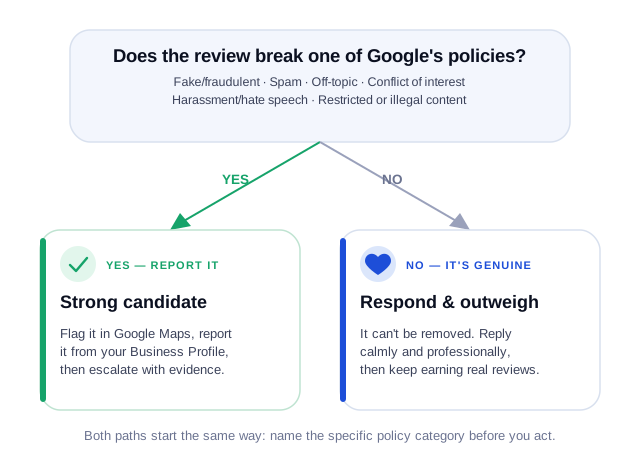
Not on demand. Google does not let a business delete a review just because it's negative or the owner disagrees with it. A review is only eligible for removal if it breaks one of Google's prohibited & restricted content policies. If it does, you can report it and Google may take it down after review. If it doesn't, the review stays — even if it's a one-star with no comment. Understanding that line is the whole game: spend your energy reporting the reviews that actually qualify, and managing (not fighting) the ones that don't.
When Google will remove a review (policy violations)
Google removes reviews that violate its review content policies. The categories that most often apply to a business trying to remove an unfair review are:
- Fake / fraudulent — reviews that don't reflect a genuine experience, including review-swaps, reviews from competitors, or content posted by someone who was never a customer.
- Spam — repeated posts, content posted from multiple accounts, reviews that are really advertising for another business, or reviews posted purely to manipulate a rating.
- Off-topic — rants about a political or social issue, content unrelated to the customer experience at your location, or a review left on the wrong listing entirely (including a different branch of the same chain).
- Conflict of interest — reviews left by you, your staff, a former employee with a grudge, or a competitor about their own or a rival business. This also covers reviews left or incentivised in exchange for payment, a discount, or free product — even when the review itself reads as genuine.
- Impersonation — a reviewer posing as someone they're not, whether a different customer, one of your own staff, or a rival's customer, to leave a misleading review under a false identity.
- Harassment, hate speech, or profanity — personal attacks, slurs, threats, or explicit language, including content that attacks a person or group based on a protected characteristic, or that names a staff member directly.
- Personal and confidential information — a review that exposes private details such as a customer's home address, a staff member's personal phone number, or financial account information. This can be removed on privacy grounds independently of whether the rest of the review is accurate.
- Restricted or illegal content — illegal or sexually explicit material, or content promoting regulated goods in breach of local law.
How to remove a Google review, step by step
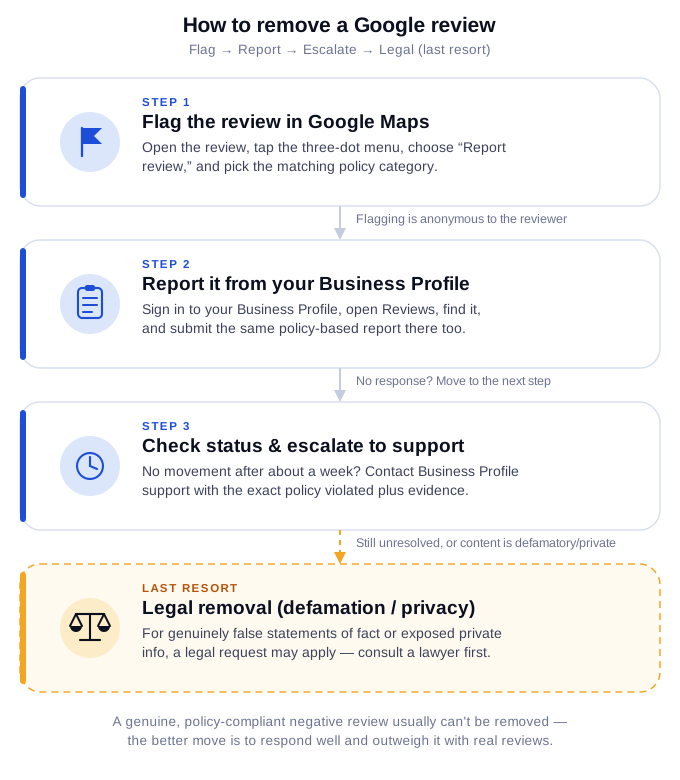
1. Flag the review in Google Maps
- Open Google Maps and find your business, or open the review directly.
- Open the menu on the review itself — depending on the device this is a three-dot menu or a small flag icon.
- Choose the option to report or flag the review.
- Select the policy category that best matches the violation and submit.
Flagging is anonymous to the reviewer and is the fastest first step. Google may not action it on the first pass, which is why the next step matters. The exact wording of the menu differs between desktop and the mobile apps and Google changes it periodically, so if the labels above don't match what you see, look for the report or flag control on the review itself — the flow is the same wherever it sits.
2. Report the review from your Google Business Profile
- Sign in to the Google account that manages your Business Profile.
- Search your business name in Google, or open your profile manager, and go to Reviews.
- Find the review, open its menu, and choose the report or flag option.
- Pick the matching policy reason and submit. Keep a note of the date, the reviewer, and the category you selected — Google won't tell you later, and you'll want it if you escalate.
Reporting from inside your Business Profile is worth doing even if you already flagged the review in Maps: it's a separate surface, and it ties the report to your verified ownership of the listing.
3. Check the removal status and escalate
If the review is still there after a reasonable wait, escalate. Google provides a review-management tool for checking the status of reports, and Business Profile support can be reached through the support options in the Business Profile Help Centre. When you escalate, state the specific policy the review violates and give concrete evidence — proof the reviewer was never a customer, or that the account belongs to a competitor. Calm, policy-specific, evidence-backed appeals are the ones that succeed; "this is unfair" is not an argument Google can act on.
How you'll know it worked
Google doesn't tell you a report succeeded at the moment it decides — it emails you afterwards. If the review comes down, you get a notification headed “A review has been removed from your Business Profile”, confirming it was taken down because it appeared to violate Google's policies. The email doesn't say which policy was cited, so keep your own note of what you reported and when.
How to remove fake Google reviews
Fake Google reviews — from competitors, bots, or people who were never customers — are the clearest removal candidates because they directly violate the fake-content and conflict-of-interest policies. Strengthen your report with anything that shows it isn't a real customer experience: no record of the person in your system, a pattern of the same account hitting competitors, a name that matches a rival, or timing that lines up with a dispute. Report it in Maps and in your Business Profile, then escalate to support with that evidence attached.
Legal options for defamatory reviews
If a review is genuinely defamatory (a false statement of fact presented as true, not just an opinion) or exposes private information, you may have a legal route. Google also has a dedicated legal removal request process separate from policy flagging. This is jurisdiction-specific and a last resort — the bar for defamation is high, and a heavy-handed legal threat against an honest reviewer can backfire publicly. This is general information, not legal advice; consult a qualified attorney before acting. Google runs a separate legal-removal process, reachable from its Legal Help pages, distinct from ordinary policy flagging. Defamation law varies significantly by country, so what qualifies where you operate may differ from the examples here.
What does NOT qualify for removal
This is the part most guides skip, and it matters just as much as the list above — knowing which bucket a review falls into before you report it saves hours and sets the right expectation. None of the following, on their own, are policy violations:
- A review is harsh, unfair-feeling, or exaggerated — but still describes a real experience with your business.
- A review mentions a real negative experience you disagree with or remember differently.
- A review is old and no longer reflects your current service.
- A review is a low rating with little or no detail — brevity alone isn't a violation.
- You simply don't like what it says about your business.
Waited three weeks for a callback and the quote ended up 40% higher than what we discussed on the phone. Won't be using them again.
If the review doesn't break the rules: the better strategy
Most negative reviews are genuine and policy-compliant — which means they won't be removed no matter how you report them. Fighting those is wasted energy. Two things actually protect your rating:
- Respond well. A calm, professional reply that acknowledges the issue and offers to make it right often impresses future customers more than the complaint itself. See our guide to responding to Google reviews and negative-review response examples.
- Outweigh it with real reviews. One 1-star among five recent 5-stars barely moves your average; one 1-star among three total reviews defines you. A steady flow of genuine positive reviews is the single best defence — learn how Google reviews work for businesses and make asking for reviews part of your routine.
Removing a review you wrote yourself
If you're trying to remove a review you left for another business, that's different and much simpler — you can edit or delete your own reviews from your Google account. See our step-by-step guide to adding, editing or deleting Google Maps reviews.